M6 Mac mini: The Best Value Mac
The most power for the money of any Mac, a great partner for a MacBook Air, and a home server when it retires.
The Mac mini is easy to overlook. It has no screen, keyboard, mouse or battery. But for many people, especially those who work from home, it’s the smartest Mac to buy.
My real work happens at a desk, always plugged into a monitor, so a laptop would have me paying for portability I rarely use. The M6 Mac mini starts at $1,449. That’s up from the $999 launch price of the M4 model, but it’s still the cheapest way to get a Mac with an M-series chip.
The money you save over a laptop can go on more memory, which does more than anything else to extend a Mac’s life. That’s how I set mine up: an M6 Mac mini on my desk, paired with my ageing M1 MacBook Air for when I leave the house. This guide covers who the Mac mini suits, whether it’s still good value, which spec to buy, why it works so well alongside a laptop, and the second life it has as a home server.
Who it’s for
The Mac mini suits anyone whose serious work happens in one place. That includes people who work from home on writing, web work, design or photos, and anyone who keeps a lot of apps running at once. With the M5 Pro option, it reaches the same kind of power as a MacBook Pro without paying for a screen, keyboard and battery that will spend most of their life on a desk.
It’s also a natural fit for people who enjoy tech projects, like home automation, a media server or a bit of coding. It’s small, quiet and cheap to leave running all day.
It’s the wrong choice if you need one computer that goes everywhere; that’s what the MacBook Air is for. And if you don’t already own a monitor, keyboard and mouse you like, the cost of adding them narrows the gap to an iMac, which gives you a very good screen in one tidy package.

A Mac mini on a desk with a display, keyboard and trackpad. Photo: Apple
Is it still good value?
The Mac mini earned its reputation as the best value Mac in 2024, when the M4 model launched at $999 with 16GB of memory. The M6 model starts at $1,449, and losing that sub-$1,000 price is a shame.
It’s still a great deal. Computer prices have risen across the market, and Apple has raised prices on most of its range during 2026, so the Mac mini has lost less ground than it first seems. It has also never been more capable. It’s the cheapest way into a Mac with an M-series chip, and only the MacBook Neo, with its iPhone chip, is a cheaper way to run macOS.
Why it works so well with a laptop
The best way to use a Mac mini is alongside a laptop. The Mac mini sits on the desk and does the heavy work, connected to a proper monitor. The laptop covers the couch, the café and travel, and when it needs more power, it can connect to the Mac mini remotely and borrow its speed.
That’s how I work. From the couch or away from home, I reach my Mac mini over Tailscale, through the browser, SSH or screen sharing, and the laptop barely has to work at all.
Because the laptop isn’t doing the heavy lifting, it can be older or lower spec than you’d normally accept. My M1 MacBook Air has only 8GB of memory and struggles when it has to run everything itself. As a window into the Mac mini, it’s still perfectly good, which has given it years of extra life.
Which spec to buy
Memory and storage can’t be upgraded after you buy, so it’s worth choosing for where you’ll be in five years. I bought mine with 32GB of memory and 1TB of storage so it won’t hit its limits for a long time, and for a computer you plan to keep, that’s money well spent.
The configurations Apple sells in Australia break down like this:
- M6 with 16GB and 512GB: the starting point for most people. Skip the 256GB model; it fills up quickly.
- M6 with 24GB or 32GB: for lots of apps, AI tools or coding projects, or for keeping it many years.
- M5 Pro, from $2,699: for developers, photographers and video work, with up to 64GB of memory, up to 8TB of storage and faster Thunderbolt 5 ports.
The M6 model goes up to 32GB of memory and 2TB of storage. For storage beyond 1TB, an external SSD on a Thunderbolt port is much cheaper than Apple’s upgrades, and on a desk it never has to move. There’s also a 10Gb Ethernet option when ordering, which is only worth it on a fast home network.
What’s good about it
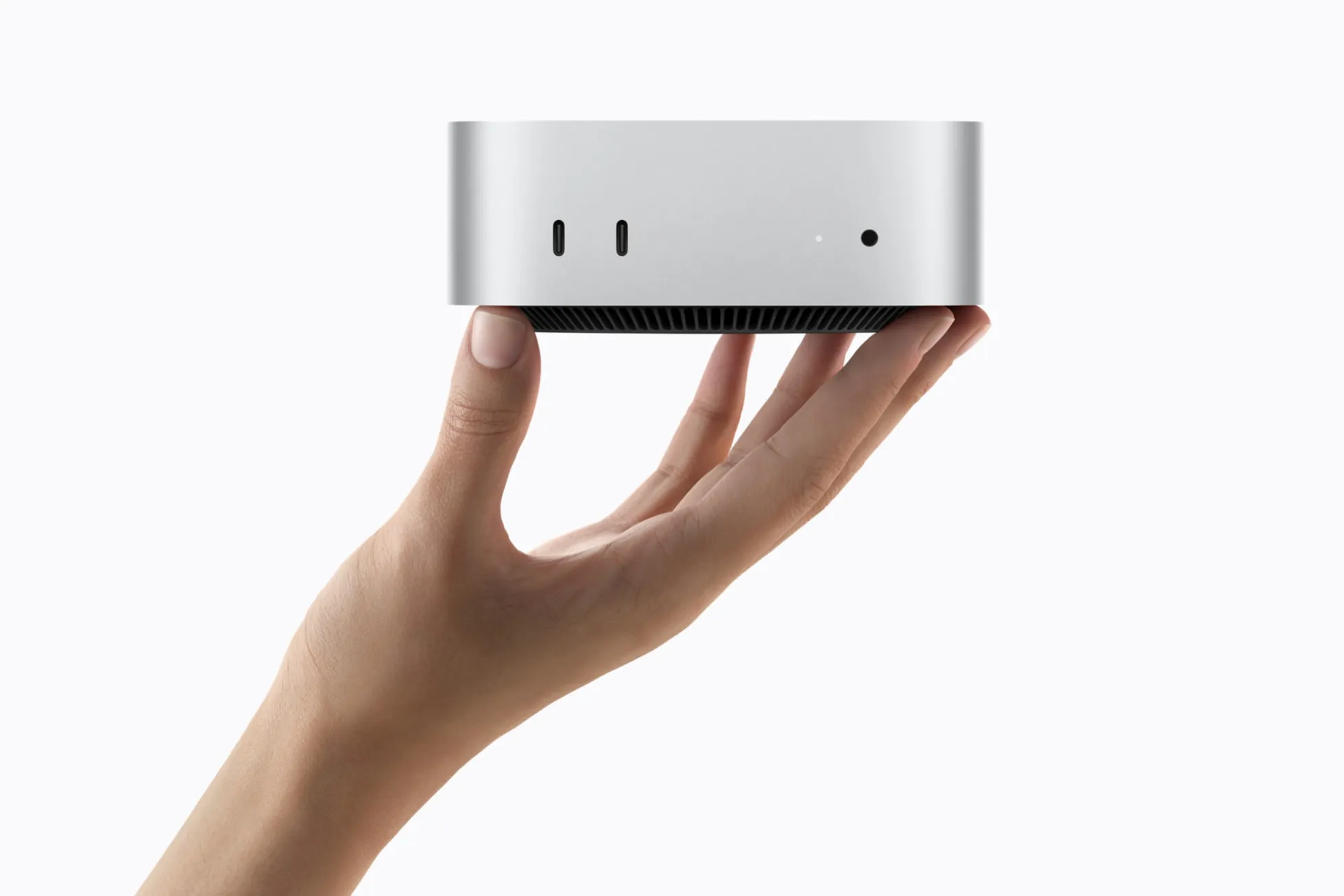
Its size is still the first thing people notice: 12.7cm square and 670 grams, small enough to disappear on a desk. The ports are in sensible places, with three Thunderbolt ports, HDMI and Ethernet at the back, and two USB-C ports and a headphone jack at the front where they’re easy to reach. It drives up to three external displays, and it has Wi-Fi 7 and Bluetooth 6.
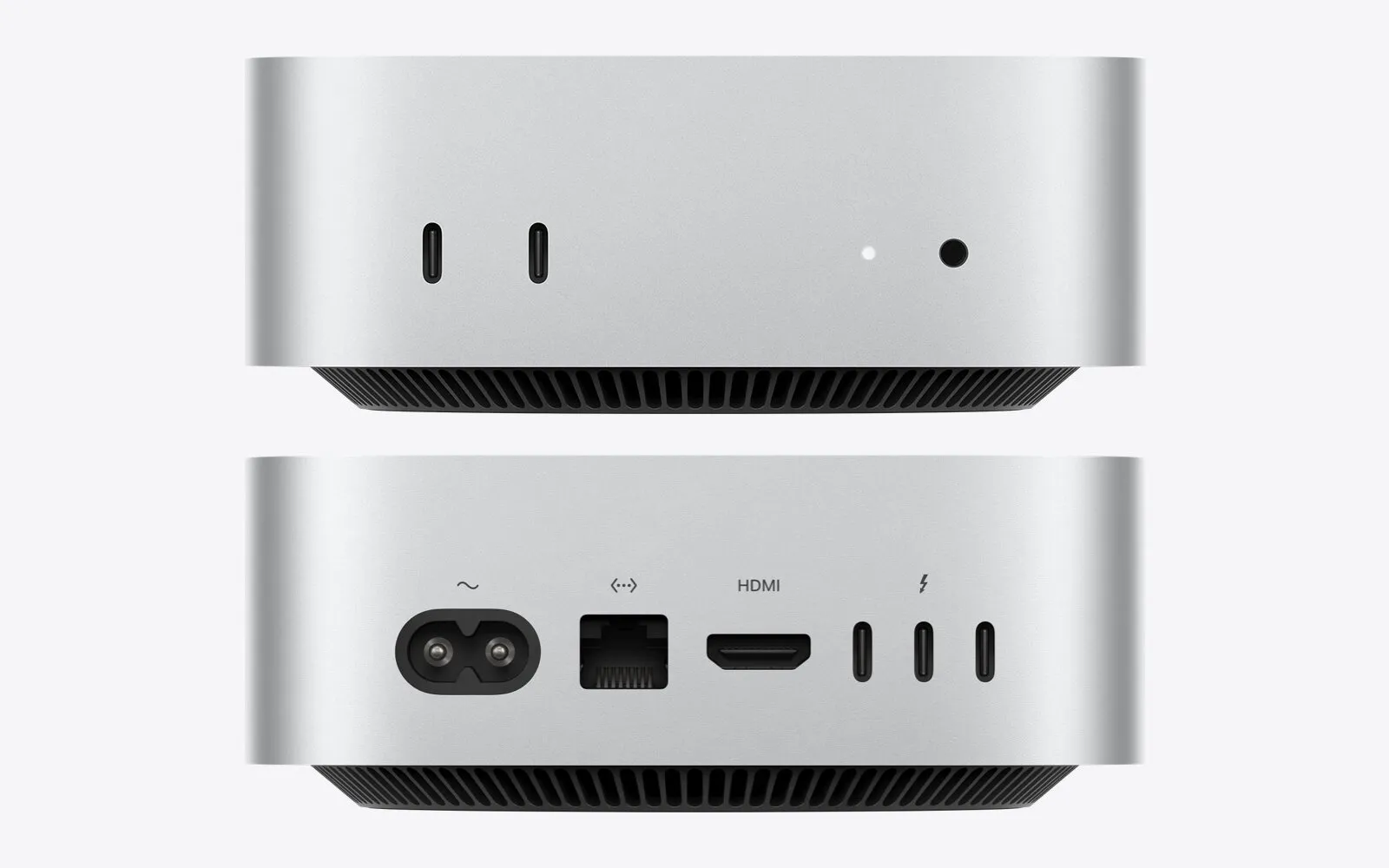
The front and back of the Mac mini. Image: Apple
Full details are on Apple’s Mac mini tech specs page.
A second life as a home server
When a Mac mini retires as someone’s main computer, it makes an excellent home server. It’s small, quiet and frugal with power, and it’s still fast. An M4 or M6 Mac mini will be useful for a very long time.
The uses keep growing: Plex or Jellyfin to stream your films and music around the house, Home Assistant to run the smart home, backups, and self-hosted web apps. Setting these up used to take real expertise. AI coding agents like Claude Code and Codex can now walk most curious people through it in an afternoon.
The alternatives
If you need more power than an M5 Pro can offer, the Mac Studio steps up for heavy video and AI work, at several times the price. If you’d rather have everything in one box, the iMac makes a lovely family or home office computer. And if the heavy work has to travel, the MacBook Pro puts similar power in a laptop.
For the whole range, see which Mac to buy.
Previous models
The Mac mini was one of the first Macs with Apple’s own chips, starting with the M1 in 2020. The M2 and M2 Pro followed in 2023, then a much smaller design with the M4 and M4 Pro in 2024, and the M6 and M5 Pro in 2026. Any of them makes a good home server today.